Showing posts with label Learn. Show all posts

How To Embed Any Facebook Post on Website or Blog

Yep, now you can embed any Facebook post whether it's your post, friends posts, or from any facebook page post. Facebook has added a new “embedded posts” feature to help you embed any Facebook content – you can embed photographs, videos or even regular status updates – on another website or blog.

You can easily embed any image on your website or blog just like embedding Youtube videos. Example:

Once embedded, a post is like a little bit of Facebook living on your website. Visitors can like the post, and share it right from your blog.

But you post want to embed, the facebook account must enable the Embedded Posts functionality. However you still can embed any Facebook content on your website even if “Embedded Posts” are not officially available for that Facebook account. Here are the trick.

Use this provided code below. Just replace YOUR_URL_HERE with the facebook post permalink.
<div id="fb-root"></div>
<script>
(function(d, s, id) {
var js, fjs = d.getElementsByTagName(s)[0];
if (d.getElementById(id))
return;
js = d.createElement(s);
js.id = id;
js.src = "//connect.facebook.net/en_US/all.js#xfbml=1";
fjs.parentNode.insertBefore(js, fjs);
}(document, 'script', 'facebook-jssdk'));
</script>
<fb:post href="YOUR_URL_HERE"></fb:post>
 If you wisht to embed another Facebook post on the same web page, you don’t have to copy-paste the entire snippet. Just add a new <fb:post href="YOUR_URL_HERE"></fb:post>

VIDEO GUIDE

Embed your own facebook page content to your blog or website to widely promoting your products.

+credit: Labnol
+Share it to recommend it!

How To Turn Your Laptop into a Wi-Fi Hotspot with Connectify!

Room distance away from WIFI router can cause minimum WIFI signal or you might be at a location where there is only one Ethernet connection available and you need to share the Internet connection with other people or devices. So you might need to create a WiFi hotspot quickly intervening so other wireless devices can use an Internet connection. Now you may make your laptop into an instant WiFi hotspot. To do so, watch this video tutorial.

VIDEO GUIDE

Download Connectify
Mirror Zippyshare [6MB]

NOTE: Connectify only works with Windows 7 Home and above, Starter is not supported.

How To Mirror Samsung Galaxy S4 on your TV


You have a Samsung Galaxy S4? Want to watch movies or share files to a larger TV screen ? It is very simple. And, as more developers support this option, mirroring can even enable you to play games on your TV while your phone acts as a controller. The S4 offers a few ways to mirror your phone's screen (not just media) onto your TV, so that whatever you see on your phone is what appears on the TV.  Depending on which accessory you use, the setup can be wired or wireless, with each solution offering its own unique benefits. Find out which scenario suits you best.

# 1: Wired
You will need, MHL Cable to HDMI Cable

# 2: Wireless
You will need, Samsung AllShare Cast Dongle

VIDEO GUIDE

Related Ads:
This method also work with other Samsung mobile, Galaxy Note 2, Galaxy S3 etc.But make sure tu use right MHL to HDMI cable for each model.

Top 10 Android Hidden Codes for Smart Phones Revealed

Most of the Android user are unfamiliar with this codes. Most of the did not know about this hidden codes. I guess, it is not important for them to know. But for the user with high curiosity, they love to know this. Here are the codes:

» IMEI Number *#06#

» Test the touch screen *#*#2664#*#*

» Phone information, usage data & battery information *#*#4636#*#*

» Camera info - Mega pixel & zoom capacity *#*#34971539#*#*

» Immediate backup of videos, songs & images *#*#273282*255*663282*#*#*

» Full information about software and hardware *#12580*369#

» Test back light or vibration *#*#0842#*#*

» Control USB logging *#872564#

» Format your smartphone *2767*3855#

» Diagnostic configuration *#9090#

Some might work, some might not work. It depends on your android mobile. Just have fun! :)

How To Bypass Password Login Screen on Windows 8

It's good to password-protect your PC to make sure that your personal files, folders, and important documents are safe and can't be modified without your permission. Though, entering the password all of the time before using your computer might frustrate you.  Here, you will be find an easy way to remove passwords in such a way that Windows will automatically get to the desktop without asking you to enter the system password. Though, you can restore it back whenever you feel that your system is not safe anymore.


VIDEO GUIDE

You can follow the same steps to bypass password screen on previous version of Windows too, not just Windows 8. Enjoy!

How to Change Color of Clothing in Photoshop

Follow this easy tutorial how to change the color of a jacket in just two minutes. Apply this new photoshop tool to all your photo edits to turn dull colors into fresh, bright ones quickly and easily. Let's do it!


You've done it in just 2 minutes. Well done!

How to Backup Contacts in Your Android Phone

You wanna change to a new phone? or switching it with other android but want to keep your contacts without to re-write it on paper. This will help you to make your job easier. Just follow the tutorial:

STEPS:
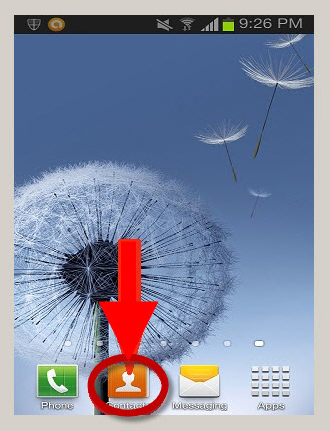
1. Open your Contacts from your Android phone.


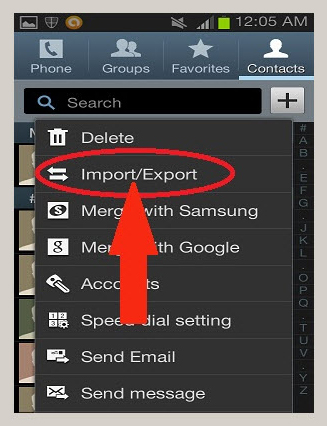
2. Press the Menu button and then select the More option from the list of menu items.

3. Select the Import/Export option to proceed.


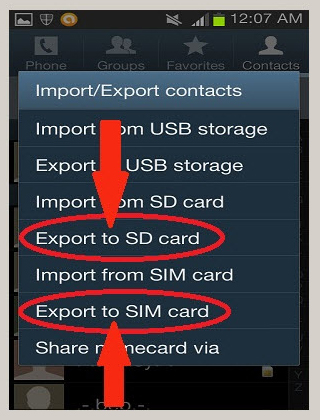
4. Now, after clicking on Import/Export, you can Select your choice of Export to either SIM card or to SD card.


Now, your contacts already back up. To have it back in your new phone, just Import it to your Phone Contacts.

DONE!

How To Make One Page Landscape in Microsoft Word

I'm sure you guys also experienced this problem. When you want to make a single landscape page, all pages follow the same. Here is how to make only single page in landscape layout.

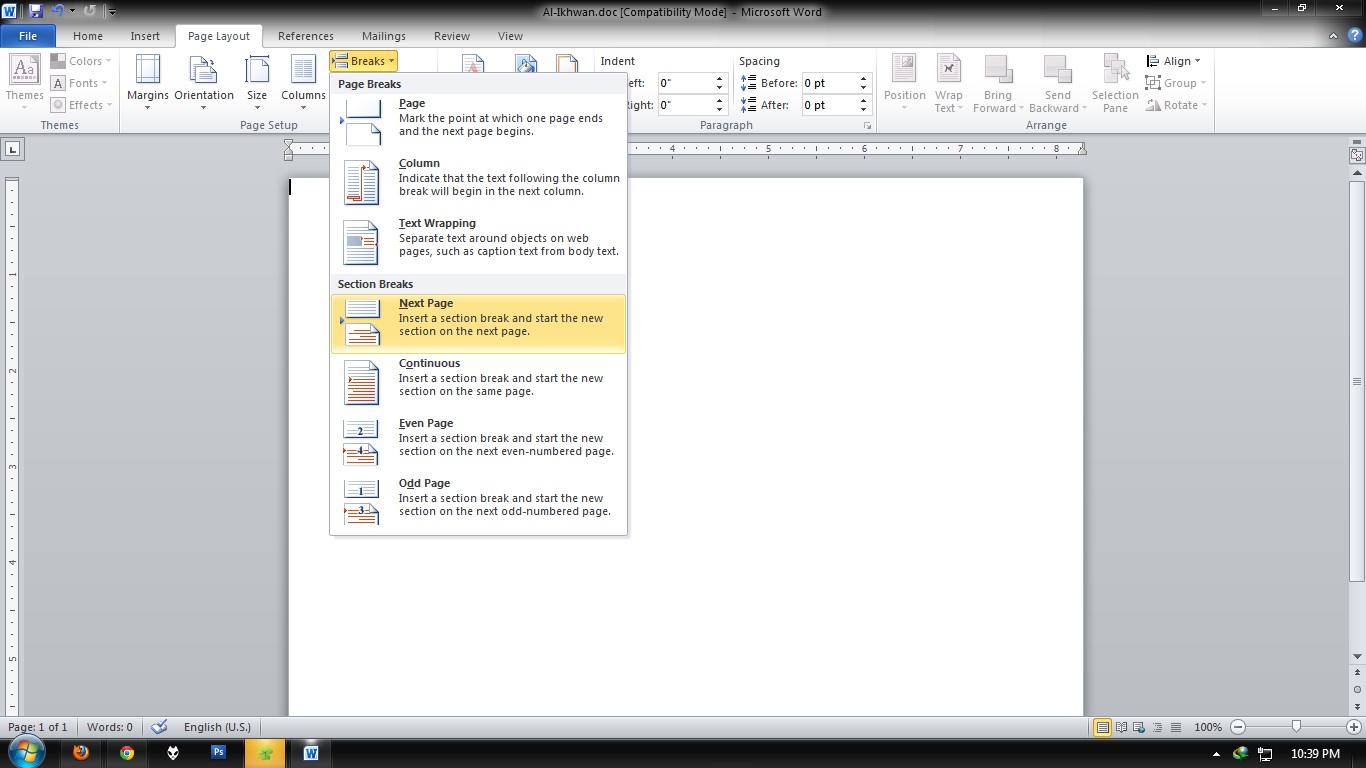
1. Go to the last page you want to keep vertical (Portrait) then select Page Layout » Breaks » Next Page


2. Now click anywhere in the page where you want to have the horizontal page (Landscape) and go to Page Layout » Orientation and select Landscape

3. Do the same steps for the following page, the one after the landscaped one, but this time choose Portrait. Only do this if you want to restore the Portrait orientation back to normal.


Now, you're know it. :)

How To Download Youtube Video via Keepvid

Youtube now available in HD. If you find it's hard to watch the HD video cause it's stuck when buffering? The only way to watch it smoothly by downloading it and play it with your media player. Actually you can download any video on your browser using IDM because it has a video grabber. But if you find it is difficult, just learn this easy way. Download Youtube video via Keepvid.

1. Go to the Youtube video that you want to download.

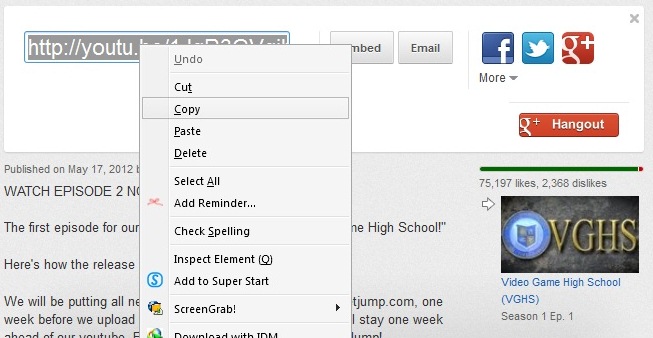
2. Then, copy the video URL;


3. Now, go to Keepvid.com

4. Paste the video URL in the download box provided and click 'DOWNLOAD'


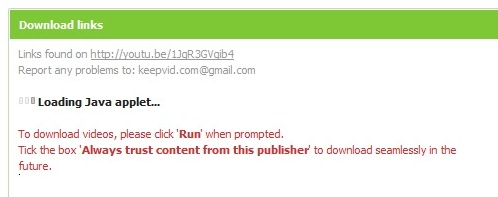
5. Click 'Run' when prompted. Tick the box 'Always trust content from thjis publisher' to start download.


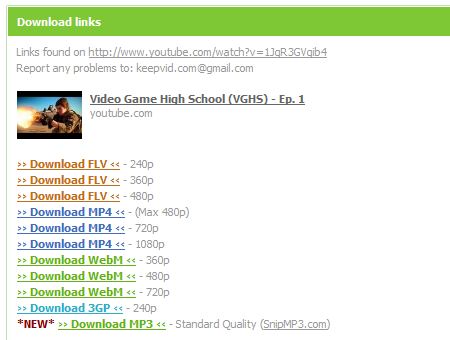
6. Now, you good to download. Success!


Enjoy!

10 Reasons To Earn Money with FANBOX


Click on the image above for 10 Reasons to earn money with Fanbox. It's awesome. Fanbox is the best.

+ Any question? Leave your comment. (^_^)

How To Get Email Notification When Someone Submit Form in Google Docs

Assalamualaikum~

In the previous tutorial, we learn to create a free form with Google docs. But some user ask me how to get notify if someone submitted form. We can get notify as soon as possible the form submitted. So, let's know it.

GET EMAIL NOTIFICATION
1. Go to your Google Docs homepage. Click on your form.

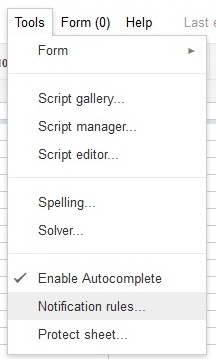
2. New tab will be open. Go to Tools tab -> Notification Rules


3. Then, just click on the Any change are made and email - right away.


4. Save. Yes, you done!

After this, if your form submitted, you will get the email notification right away.

How To Make Your Own Air-Conditioner

Nowadays, it's getting hot (actually Asia). This situation make us sweat and feel uncomfortable. If your home has an air-cond, well it's good because you always feel cool. But if you don't have an air-cond, this is How-To make your own Air-Conditioner. And you only need a few bucks to made it! Let's go!!

How To Make 3D Glasses / Spectacles

Now, 3D is getting popular again. So, How-To House will help you to make your own 3D glasses. It's easy and simple. Everybody can make it. So, don't waste your time guys. Let's start!! 

How To Do Skills In PES 2010 [Tutorial]


Sometimes we want to make a skills to show our style in playing game like PES 2010 but the problem is, we don't know how to do the tricks. So, this is some skills you can practice in PES 2010 to beat your friends. Learn how to do skills in PES 2010. Enjoy!

How To Watch Youtube And Dailymotion In Windows 7 Media Center

Are you like to browse any video from Youtube? or like to watch video from Dailymotion? Have you been looking for a way to watch your favorite viral videos from YouTube and Dailymotion from the couch? This is HOW-TO watch Youtube just use plugin which allows you to watch streaming video in Windows 7 Media Center.

How To Change Your PES 2010 Background [Tutorial]

Maybe you are bored with your PES 2010 Menu. You feels like want to replace it with other pictures or your own image. You can do it by follow this tutorial. You can edit any of the Menu pictures by your own taste. You will need software called Game Graphic Studio to edit all this things. So, let's begin. 

How To Solve Rubik's Cube [Tutorial]

The Rubik's Cube is a 3-D mechanical puzzle invented in 1974 by Hungarian sculptor and professor of architecture ErnÅ‘ Rubik. Actually, it's originally called the "Magic Cube", the puzzle was licensed by Rubik to be sold by Ideal Toys in 1980. This cube also won the German Game of the Year special award for Best Puzzle that year. As of January 2009, 350 million cubes have sold worldwide making it the world's top-selling puzzle game. It is widely considered to be the world's best-selling toy. 


How To Take a Free Kick in PES 2010 [Tutorial]


When you got a free-kick in front of the penalty box, you are willing to score a goal just like Ronaldinho, Beckham, C. Ronaldo or Roberto Carlos. You feel like you want to score a nice goal like them. But to do that, you need to know how to take the free-kick perfect with high accuracy. Take your little time to learn how-to take a perfect free-kick in PES 2010.

How To Delete Virus or Unwanted File (using Command Prompt)

There is a various type of viruses on the net. Sometimes, we just can't delete a virus using our anti-virus. Virus will always be our PC enemy. So, this is how to delete virus or unwanted file manually. Watch this tutorial.

How to Recover Permanent Deleted Files

You deleted your file accidentally? You want to get the files back? Don't worry. HH bring you good news: you can get all those back, free of charge. his is how to recover your deleted files. Follow these steps :