Showing posts with label Online. Show all posts

Create Your Own Website Barcode (QR code)


A QR code (abbreviated from Quick Response code) is a type of matrix barcode (ortwo-dimensional code). Create link to a website with our generator and change it into a mobile barcode, which can then be scanned using a camera phone.  

Generate your site barcode/QR code using the generator below. You also can generate message, Phone number, SMS or email barcode.


How to scan and decode mobile barcodes:
Point and shoot your mobile camera phone at a mobile barcode to connect directly to a website. All you need is a barcode scanner/reader for your mobile camera phone. Some phone already got Barcode Scanner installed. For Nokia phone, you can find it :

Menu ->> Applications ->> Office ->> Barcode.

Check whether your mobilephone already has a preinstalled code reader. You can download a Barcode Scanner apps by the link below.    


Taste the technology.
How To Get Rid of Babylon Search

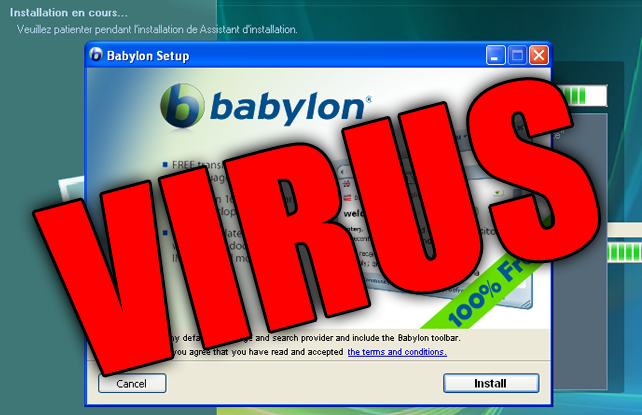
Do you have problem with Babylon search with your Mozilla Firefox? That was extremely annoying. So, let's get rid of it quickly. This is the most worked way to remove it.


STEPS
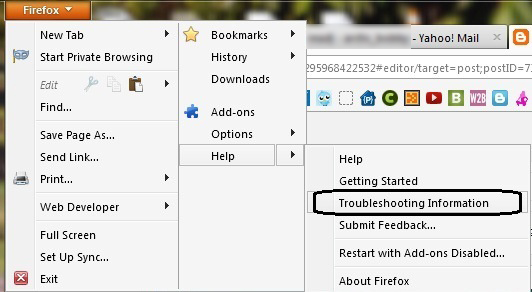
1. Go to Firefox tab -> Help -> Troubleshooting Information


2. Then, click on the "Reset Firefox"


3. Firefox will restart and will work perfectly after that.

Bye bye Babylon. :P

Leave your comment as appreciation.  :D

How To Fix Multiple Networks at Startup But No Internet Access

Can't connect to the internet because it's showing as being connected to multiple networks? A Home network and an Unidentified network.  When you facing this problem, just follow this tutorial.

Apparently there is an Apple program called "Bonjour Services" it is installed in Windows 7 with programs like iTunes. It is also installed with Adobe PS3 programs but usually shows up as ##Id_String1.6844F930_1628_4223_B5CC_5BB94B879762## in Adobe.

To see if you have the Bonjour service or ##Id_String1.6844F930_1628_4223_B5CC_5BB94B879762## running on your PC.

1. Click Start Right-click "Computer" and select "Manage".
2. Expand "Services and Applications" -> "Services".
3. Find the Bonjour name or ##Id_String1.6844F930_1628_4223_B5CC_5BB94B879762## in the list of services.
4. Double-click this to open up a Window.
5. Under the General Tab next to Start-up Type Select Disabled from the drop down.
6. Finish!

Now test and see if you still have connectivity issues. Good luck!


credit: w7forum.com

How To Bypass Survey To Continue Download in Most Website

This surveys always annoys user and make us not interested to download the file we want. It kills our interest. The site like sharecash use this surveymethod to earn some money. The surveys is look something like this:


You wanna get rid from this annoying survey? Actually it's really easy to bypass the freakin' survey. Let's know how.

BYPASS SURVEY
All you need to do is DISABLE JAVASCRIPT.

Mozilla - Go to Options ->> Content ->> Uncheck Enable Javascript.


Same goes to other browser. Just DISABLE JAVASCRIPT.

Easy aite! Enjoy your downloads! =)

How To Unlink Fanbox From Facebook Account

For Fanbox user, if you link your facebook with fanbox. All your activity in Fanbox will be showm in Facebook. Sometimes it's annoying. If you want to unlink Fanbox from Facebook, just simply follow this step.

UNLINK FANBOX FROM FACEBOOK
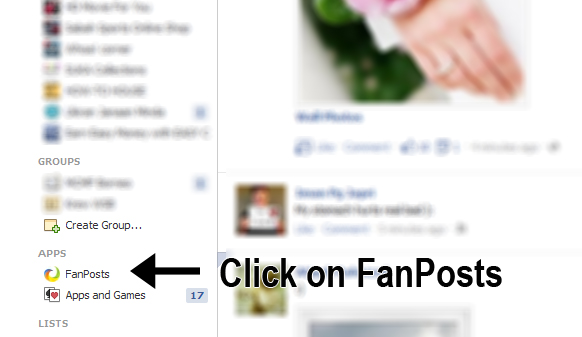
1. In facebook at the left side, under Apps column. Find Fanposts. Click on it.


2. If you can't find it, click "More" button next to Apps. Then, search for Fanposts.


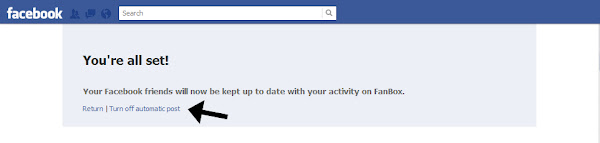
3. Then, just click on "Turn off automatic post".


4. Finish!


Happy blogging! :)

How To Embed Youtube Video in Blogger

This is the simple tutorial for those are new to blogging world. You can embed any video from Youtube  in your blog. You only need to follow this few step.

EMBED YOUTUBE VIDEO IN BLOGGER
1. Go to any Youtube video URL that you want to embed in your blog.

2. Click "Share" button,


3. Click "Embed" and copy the embed code.


- You also can customize video width and height before you copy the embed code.


4. Then, go to your post editor area. In Edit HTML section, paste the embed code in. Then go back to Compose section.


5. That's it. Finish!

Now, you can embed any of your favorite video in your blog. Hope you love it! :)

Protest on SOPA: Internet Blackout

The sites which protest against the SOPA (Stop Online Piracy Act). What is SOPA about? Read here. This sites blackout their site. The sites is included Wikipedia, Google, Firefox, Twitpic, Wordpress, Flickr, OpenDNS.


The online SOPA/PIPA protest (internet blackout) ends....for now.

The Wikipedia blackout is over — and you have spoken.

More than 162 million people saw our message asking if you could imagine a world without free knowledge. You said no. You shut down Congress’s switchboards. You melted their servers. From all around the world your messages dominated social media and the news. Millions of people have spoken in defense of a free and open Internet. For us, this is not about money. It’s about knowledge. As a community of authors, editors, photographers, and programmers, we invite everyone to share and build upon our work.

Our mission is to empower and engage people to document the sum of all human knowledge, and to make it available to all humanity, in perpetuity. We care passionately about the rights of authors, because we are authors. SOPA and PIPA are not dead: they are waiting in the shadows. What’s happened in the last 24 hours, though, is extraordinary. The internet has enabled creativity, knowledge, and innovation to shine, and as Wikipedia went dark, you've directed your energy to protecting it.

We’re turning the lights back on. Help us keep them shining brightly.

[source]

How To Get Email Notification When Someone Submit Form in Google Docs

Assalamualaikum~

In the previous tutorial, we learn to create a free form with Google docs. But some user ask me how to get notify if someone submitted form. We can get notify as soon as possible the form submitted. So, let's know it.

GET EMAIL NOTIFICATION
1. Go to your Google Docs homepage. Click on your form.

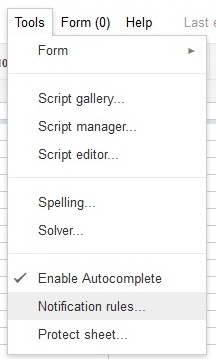
2. New tab will be open. Go to Tools tab -> Notification Rules


3. Then, just click on the Any change are made and email - right away.


4. Save. Yes, you done!

After this, if your form submitted, you will get the email notification right away.

How To Create Free Form in Blogger

You just need to use Google Docs. Web forms in Google Docs are a great choice for creating forms like Contact Me/Contact Us or for conducting polls and surveys since it's free and no limits of people can participate. It is also great because all replies are directly saved in an online spreadsheet. It becomes more easy to analyze your own data.


How To Add Google Plus Profile Widget in Blogger

This widget will show real time followers stats of Google Plus circles and also with a “Add me To Circles”  Button. It's completely customizable. The number of followers displayed automatically. You just need to get the code and put it on your blog. Add it now!

How To Add Static Twitter Follow Me Button in Blogger

Wanna make your visitor to easy to follow you in Twitter? Twitter is the good social network to promote your blog. Why? Because Twitter is second most popular social network with 200,000,000 estimated unique monthly visitors according to eBizMBA. This widget is the best to do so . Let's add it.

How To Embed Youtube Subscribe Widget on Blog

Everybody knows how Youtube works and it become the most popular place to search any video. Do you? So, HOW-TO HOUSE will guide how to embed Youtube Subscribe Widget on your blog. It's simple and easy. You can add the widget in just 3 steps :

How To Save Windows Movie Maker as HD in Windows 7


Windows 7 users have some problem to save Windows Movie Maker (WMM) video as High Definition (HD) format such as HD 1280x720, HD 1440x1080, HD 1920x1080 or HD 960x720 just like in the Windows Vista. So, HOW-TO HOUSE  want to share tutorial how to save Windows Movie Maker as HD video in Windows 7. So, let's start guys.

How To Earn Money with Adf.ly

Adf.ly is an easy way to earn money through your blog. Why? Adf.ly will pay for you to just shorten your url with Adf.ly. This is one way to get money through a blog. (Free Registration : Adf.ly)

adf.ly - shorten links and earn money!

What is Adf.ly ?
Adf.ly are a free URL shortening service. Get paid to share your links on the Internet!  Just register for an account and start shrinking.  You get paid for every person that visits your URLs. Isn't that sounds good? Register now!

How Adf.ly Works ?
Earn more than $4.00 / 1000 visitors to your links.  Get tiny URLs, great for when text space is limited.  All advertising is strictly family-safe with no popups.  Real-time statistics with revenue breakdown.  Refer users and get a massive 20% commission.  Many tools - Mass Shrinker, Easy Link, API  Easy-to-reach $5.00 minimum payout. Adf.ly payment is via PAYPAL. You can check Adf.ly payout rates here.

* You need a PAYPAL account to received the payment. Guide : Create a Free PAYPAL Account.


How To Join Adf.ly ?
1. It's a free registration. Just go to this link.

2. Click on the Join Now.


3. Then fill in the registration form and Submit.


4. Now, you're ready to earn some money by shrinking your URLs and share it to the world.


URL sample : Shorten HOW-TO HOUSE URL >>  http://adf.ly/FOYi


adf.ly - shorten links and earn money!
Get paid to share your links!


Start earning now! :)