How To Embed Instagram Photos or Videos on a Website or Blog

Having trouble to embed Instagram images or videos on your blog? Embed code is not found everywhere. Now we will learn how to embed Instagram images and videos through this video. Got in done in 2 minutes. Start to promote your Instagram images and videos in your website or blog.

VIDEO GUIDE

Embed instagram images and videos easily.

How To Shorten Your Links Using Your Own Domain Name

Of course we all know about Adf.ly and how it can make money for us by just shortening. It works well with me. Every end of the month, Adf.ly will credit my earning to my Paypal account. But, for who don't have idea what is Adf.ly is about, read my article in the previous post

Adf.ly just added new tool to their users which called Domain. This tool will allow you use to use your own custom domain names or sub domains with Adf.ly service. There are many benefits for doing this:

Website branding - if your blog is URL is http://www.wrestling.com, your adf.ly links could now look like http://go.wrestling.com/Ad3g
Greater number of clicks - people are starting to associate an adf.ly link with advertising and may not click a link for this reason.
Peace of mind - you own the domain and can download an Excel export of all of your URLs. If you were worried adf.ly may disappear one day (it won't!) then you are in full control.
Low profile - in the past Twitter and other services have had problems with adf.ly links. If you use a custom domain, an automated scan will not detect adf.ly links on your account.

People will no more face problems with Facebook or Twitter or any other website Blocking Adf.ly. It adds more credibility to your shortened links so your visitors, when they see your domain name, will trust it and go for it .

LET'S START
1. First of all, you will need Adf.ly account. Register for free here.

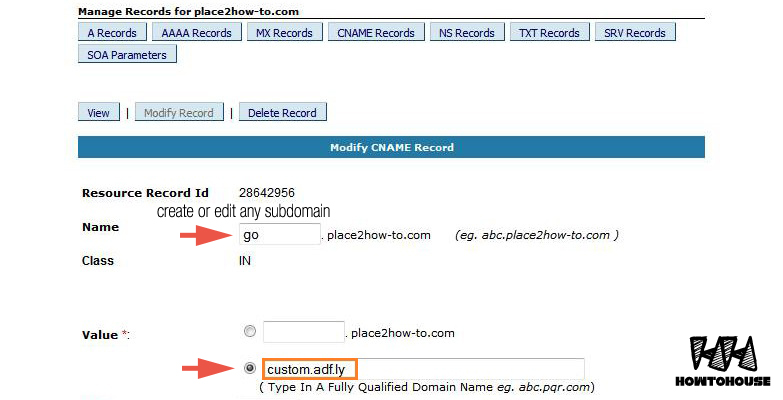
2. Then go to the Cpanel of your website => DNS Zone Editor => Add a new CNAME RECORD

3. In the Name section, enter any subdomain you want but not an existing one. In the Value*, enter the following adress custom.adf.ly

4. Save the CNAME. Now, you're done with CNAME.

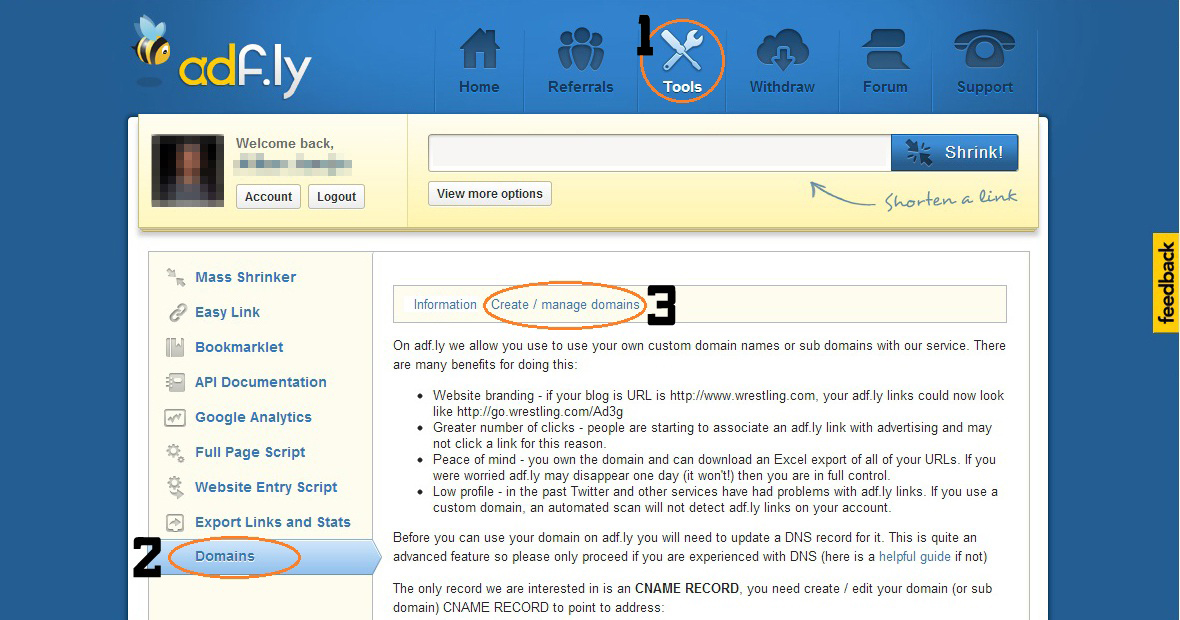
5. Return to your Adf.ly account. Go to Tools => Domains => Create / manage domains

6. Enter your sub-domain in the box and Add Custom Domain

7. Congratz! Now, you should see your sub domain listed in the domain section. You can start making money with your Adf.ly.

With this feature, Adf.ly links is look trusted and visitor has no worries to click it.

+Share it to recommend it! :D

PESEdit.com 2013 Patch 4.1

PESEdit.com 2013 Patch 4.1 released. The new PESEdit.com 2013 Patch 4.1 adds 200+ 13-14 transfers for PES 2013, as well as new 13-14 kits for 40+ teams.

New Features
• Transfers: 200+ summer transfers added
• Created 35+ new players
• Almería added to Liga BBVA replacing Mallorca
• New balls: Nike Incyte, Incyte EPL, Incyte LC, Incyte LFP, Incyte Hi-Vis
• New kits: Aalen, Anzhi, Athletic Club, Aue, Augsburg, Bielefeld, Bochum, Braunschweig, Burnley, Cardiff, Celta Vigo, Charlton, Crystal Palace, Dresden, Düsseldorf, Eintracht Frankfurt, Everton, Freiburg, FSV Frankfurt, Fürth, Hoffenheim, Huddersfield, Hull, Ingolstadt, Juventus, Karlsruher SC, Köln, Lugo, Mönchengladbach, Paderborn, PSV, Sandhausen, Santos, Schalke, Southampton, Swansea, Union Berlin, Valencia, Vitesse, West Bromwich, West Ham, Wigan

General Features
• Added new 1st division leagues: Bundesliga, Primera Division Argentina, Liga MX, Russian Premier League, Spor Toto Süper Lig, Superleague Greece, Raiffeisen Super League Added new 2nd division leagues: 2. Bundesliga, Liga Adelante, Npower Championship, Serie B, Ligue 2, Brasileirão Série B, Primera B Nacional
• Added other teams (Arminia Bielefeld, BATE Borisov, BSC Young Boys, Dnipro Dnipropetrovsk, FC Basel, KRC Genk, Metalist Kharkiv, Steaua BucureÅŸti, Videoton FC, Viktoria Plzen + Indonesia, Malaysia)
• Correct kits for all Premier League, Liga ZON Sagres + all National & Classic Teams
• Corrected names for fake players in unlicensed National teams and ML unlockable players
• Faces: ~800 new faces (all fixed by PESEDIT)
• Fixed kits for a lot teams including Barcelona, Manchester United and Sevilla
• Includes newest DLC 6.00 & game version 1.04
• Scoreboard and stadium switch in selector (download stadiums here)
• Removed blur
• Fixed boots + accessories for a lot players (Premier League, Ligue 1, Eredivisie, Serie A, Liga BBVA, Bundesliga and many more)

Download [6 part] Uploaded
PART 1
PART 2
PART 3
PART 4
PART 5
PART 6

Download via Torrent

Extract and install it! Enjoy.

+Share it to recommend it!

How To Download Youtube Videos from Android Device

While you watching Youtube video, suddenly internet connection going slow and interfere your fun time watching video. It's keep buffering and makes you frustrated. So, to watch the video smoothly, just download it to your android device. This video teaches you what is the best youtube video downloader for Android and how to download youtube videos with it on your Android.

VIDEO GUIDE

Related Ads:
Enjoy your video! :D

How To Turn Your Laptop into a Wi-Fi Hotspot with Connectify!

Room distance away from WIFI router can cause minimum WIFI signal or you might be at a location where there is only one Ethernet connection available and you need to share the Internet connection with other people or devices. So you might need to create a WiFi hotspot quickly intervening so other wireless devices can use an Internet connection. Now you may make your laptop into an instant WiFi hotspot. To do so, watch this video tutorial.

VIDEO GUIDE

Download Connectify
Mirror Zippyshare [6MB]

NOTE: Connectify only works with Windows 7 Home and above, Starter is not supported.

How To Mirror Samsung Galaxy S4 on your TV


You have a Samsung Galaxy S4? Want to watch movies or share files to a larger TV screen ? It is very simple. And, as more developers support this option, mirroring can even enable you to play games on your TV while your phone acts as a controller. The S4 offers a few ways to mirror your phone's screen (not just media) onto your TV, so that whatever you see on your phone is what appears on the TV.  Depending on which accessory you use, the setup can be wired or wireless, with each solution offering its own unique benefits. Find out which scenario suits you best.

# 1: Wired
You will need, MHL Cable to HDMI Cable

# 2: Wireless
You will need, Samsung AllShare Cast Dongle

VIDEO GUIDE

Related Ads:
This method also work with other Samsung mobile, Galaxy Note 2, Galaxy S3 etc.But make sure tu use right MHL to HDMI cable for each model.

Top 10 Android Hidden Codes for Smart Phones Revealed

Most of the Android user are unfamiliar with this codes. Most of the did not know about this hidden codes. I guess, it is not important for them to know. But for the user with high curiosity, they love to know this. Here are the codes:

» IMEI Number *#06#

» Test the touch screen *#*#2664#*#*

» Phone information, usage data & battery information *#*#4636#*#*

» Camera info - Mega pixel & zoom capacity *#*#34971539#*#*

» Immediate backup of videos, songs & images *#*#273282*255*663282*#*#*

» Full information about software and hardware *#12580*369#

» Test back light or vibration *#*#0842#*#*

» Control USB logging *#872564#

» Format your smartphone *2767*3855#

» Diagnostic configuration *#9090#

Some might work, some might not work. It depends on your android mobile. Just have fun! :)

How To Remove Links From Blogger Comments Automatically With jQuery

Every blogger hates spammer. So to combating them is by preventing the use of HTML-based codes that enables the embedding of hyperlinked texts. You can remove links from blogger comments Automatically with jQuery. Simply follow the instructions below.

#STEPS:
1. Go to Dashboard ->> Template ->>; Edit HTML

2. Search this code (Ctrl + F), </body>, and then copy/paste the code below just right above it.
<script src='https://ajax.googleapis.com/ajax/libs/jquery/1.8.3/jquery.min.js'/>
<script>$('.comment-content a[rel$=nofollow]').replaceWith(function(){return ($(this).text());});</script>

3. If you want the hyperlinked texts removed entirely than just disabling the hyperlinked text, then copy/paste this code below instead.
<script src='https://ajax.googleapis.com/ajax/libs/jquery/1.8.3/jquery.min.js'/>
<script>$('.comment-content a[rel$=nofollow]').hide());</script>

NOTE: If you already have the part that’s highlighted already in your template’s code then exclude it and just copy the remainder of the code.

4. Save your template. That’s it. Done!

Share it to your friends!

How To Setup Mail Apps in Windows 8

Setup your email to work more comfortable and close with your mail or mailbox.With the help of this video you can easily setup your mail apps in windows 8. Just follow the steps, shows in this video.


Credit for Randy Mckown this nice video.

How To Disable Lock Screen in Windows 8

Time is important, and for others, it's simply just being impatient. Having your computer start up as quickly as possible is usually a plus for anyone. If you have Windows 8, the start up times have drastically improved compared to older systems, Win7, WinXP. You want to speed up things ever faster, just disable the lock screen.

The lock screen is a nice little addition, but not necessary for PC users. It's just a cover for the login screen that tells you the time, weather, and date. To get to the login screen, you can drag it up and away, hit escape, or click on it. To get rid of it completely, follow these quick guide.

Step 1: Open Run
You will need to launch the Local Group Policy Editor. To do this, hit the Windows Key and R to open up the all-too-familiar Run program. 

Step 2: Open Local Group Policy Editor
Type gpedit.msc and then click OK. This will now open up the Local Group Policy Editor.

Step 3: Open Personalization
From the screen shown above, click on Computer Configuration -> Administrative Templates -> Control Panel -> Personalization.

Step 4: Lock Screen Settings
You will see the option Do not display the lock screen. Double-click on this and the window below will pop up.

Step 5: Enable "Do Not Lock"
The Do not display lock screen is currently not configured, so make sure to select Enabled and press OK.

Not sure yet? Follow the steps from this video guide.

Double Check  To ensure you have done everything correctly, go back to the Local Group Policy Editor -> Computer Configuration -> Administrative Templates -> Control Panel -> Personalization, and make sure that it shows Do not display lock screen is Enable.

 Now, your Lock Screen should no longer come up. Share to your friends!