Facebook Messenger For Firefox - Chat Wherever You Go On The Web

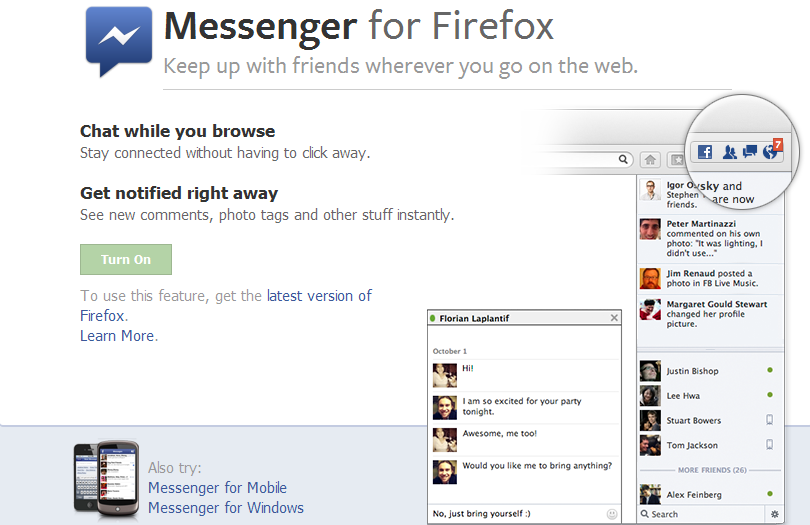
To Firefox browser user, this one is special for you. Mozilla launched the latest features to Firefox 17, it's Facebook Messenger. Facebook Messenger for Firefox lets you keep up with friends wherever you go on the web!


Facebook Messenger for Firefox
»  To use this new feature, upgrade your Firefox browser or get it here -  Firefox version 17

»  Go to page Messenger for Firefox and click 'Turn On'.


No need to go to the Facebook tab or install messenger on your PC. Facebook Messenger for Firefox is more easier. Enjoy! :)

Don't forget to share with your friend.

Find Out Who Unfriend Or Decline Your Friend Request on Facebook

Facebook gives us the opportunity to find our old friends and stay in touch after a long time. In addition, we also can add new friends to make our facebook network bigger. Before someone included in our friends list, request must be accepted first. Some accepted, others rejected. In many requests, may have a decline. To find out, use this facebook apps.


UNFRIEND FINDER
1. Log in to your Facebook account. Type "Unfriend Finder" at Facebook search bar or just go to this link - apps.facebook.com/friendshipmonitor


2. Manage who can see the post. Then, Go to App.


3. Look for the result. :)


After you figure out who rejected and decline your request, do not got angry and mad at them. They must have a certain reason for that. : P

Enjoy! Share to recommend.

Scan URL Wether It Is Safe or Not

Some of URL link in the internet are not safe because of viruses, worms, malware or anything, you name it. Before you are stuck with an insecure link, it's better scan before clicking on the link URL. You can scan these suspicious links before you click on them. 

URLVoid 
URLVoid is a free link service to scan any suspicious URL. Just go to the website, and paste your URL there, and it will tell you whether it is safe or not.


Stay calm & happy browsing! :)

Increase Your Facebook Pages Likes with AddMeFast

Facebook is second ranked the most popular website in the world. A vast network of facebook can be an effective form of marketing. To become a success full publisher you should have your own Facebook community page, it’s not only vital but play significant role in building traffic as well as the backlinks. But to get your Facebook page spread, 'like' is most needed. If more people 'like' your page, the more extensive marketing through the page. To get the 'like' not as easy you think also a bit difficult. You can ask friends, family, or friends of your friends but still not enough. So, you will need this few steps to increase your Facebook Page Like. Let's know how ...

AddMeFast
What is AddMeFast? AddMeFast is a website that provides services to increase facebook like page. Not only that, there are also services for other social media such as Youtube, Twitter, Google Plus, Pinterest and others. Is it a real likes? Yup, real human likes.

It is also very easy to use. Follow the following steps:

Step 1:
Just need to register here - AddMeFast. Then, verify your registration in your email inbox.


Step 2:
After registering and verifying your Email Address, login to your account. Then, add Facebook Page/Site that you want to get likes. You can add more than 1 site or page.


Type: Select 'Facebook Likes' if you want to increase Facebook Page likes. You can choose other type for other services.
Title: Enter the title of your page/site.
Site/Page URL: URL of your Facebook page or any link that you want to target for likes.
CPC: It's up to you. The more higher you bid, the faster likes you will receiver. Most recommended is between 5 - 10 points.

When everything done, Save Changes.

Step 3:
Now you have to like other pages to earn points. These points will help you to increase your likes the more you earn points, the extra like you will get. Following is the list of services that could earn you free points. Facebook Likes, Facebook Subscribers, Twitter Follow, Google Plus Circle, Google Plus one, YouTube Subscriber, YouTube Views, Pinterest Followers, Sound Cloud, Stumbleupon Followers etc.


Now, you have to collect points. More points, more Likes you can get. You can refer your friends earn 300 points for each friends.

Share/Like if you Like it! :)
PES 2013 Tricks & Skills Tutorial - All Feints

Special for PES 2013 fans. It was difficult to play without a good ball control skills. Therefore, this tutorial will teach how to control better movement of individuals and as a team. Time to learn! 


Play 'Tiki-taka' like Barcelona, strong individual skills and good teamwork can be mastered when already understand this game movement. Enjoy it!

Get Latest News For Blogging Idea with Google Alert

Sometimes we do not have an idea to write on the blog. Here we will teach you several ways to get ideas and the latest news from the internet. This service is free without any charges. There are also services that require payment.

Ideas and latest news to make your blog content always updated and more attracted by readers of your blog. Here it is:

GOOGLE ALERTS
http://www.google.com/alerts/

Google Alerts is the best way to track the progress of the topic you're writing on a blog. Google will send you e-mail notifications about articles and the latest news on the internet based on your keywords.

Enter your keywords and click [Create Alert]. Google will send an e-mail notification to you depend on your settings. When you choose once a day, Google will send alerts via e-mail to you every day.


That's it! Use Google Alerts to get the latest news and ideas to produce fresh entries to your blog. Enjoy!

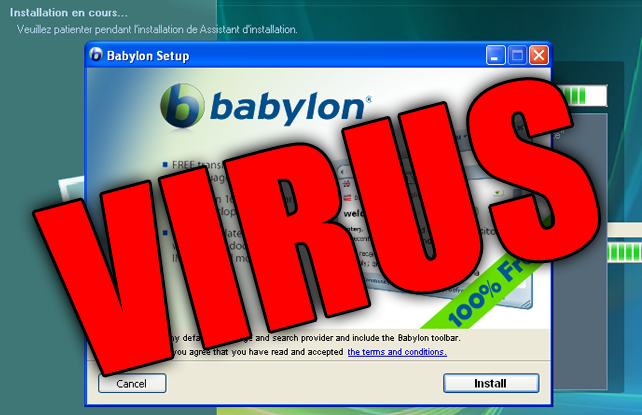
How To Get Rid of Babylon Search

Do you have problem with Babylon search with your Mozilla Firefox? That was extremely annoying. So, let's get rid of it quickly. This is the most worked way to remove it.


STEPS
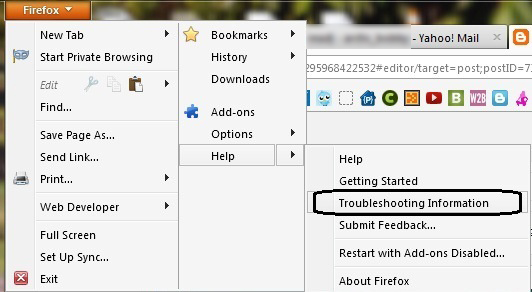
1. Go to Firefox tab -> Help -> Troubleshooting Information


2. Then, click on the "Reset Firefox"


3. Firefox will restart and will work perfectly after that.

Bye bye Babylon. :P

Leave your comment as appreciation.  :D

How To Solve PES 13 WAS NOT INSTALLED?

If you installed the PESEdit 2013 latest 1.0 patch, some will have this problem "PES 13 WAS NOT INSTALLED?". Annoying right? So, this is how to solve it. 

STEPS
1. Go to Start Menu type Regedit and Enter

2. Now, go to HKEY_LOCAL_MACHINE -> SOFTWARE -> Wow 6432Node -> KONAMI -> PES2013

3. Then double click on code and enter

SHVY-3LE9-TMNH-7K5L-JN73 or,
E5DW-NHA5-RR9T-DLMH-A6NP or,
JX3P-2V79-SYH5-Y46F-TC7L

4. DONE! Make sure Run PESEdit.com 2013 Patch as Administrator.

Now, you should able to play it. Enjoy! Share it!

How To Download Youtube Video via Keepvid

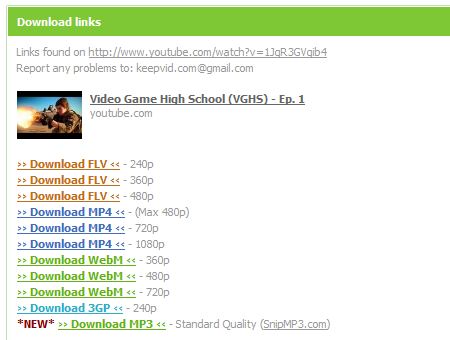
Youtube now available in HD. If you find it's hard to watch the HD video cause it's stuck when buffering? The only way to watch it smoothly by downloading it and play it with your media player. Actually you can download any video on your browser using IDM because it has a video grabber. But if you find it is difficult, just learn this easy way. Download Youtube video via Keepvid.

1. Go to the Youtube video that you want to download.

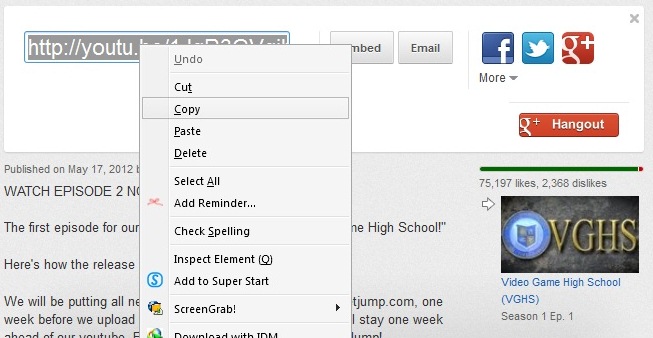
2. Then, copy the video URL;


3. Now, go to Keepvid.com

4. Paste the video URL in the download box provided and click 'DOWNLOAD'


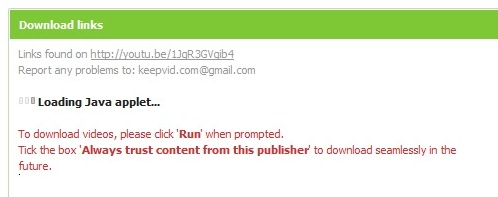
5. Click 'Run' when prompted. Tick the box 'Always trust content from thjis publisher' to start download.


6. Now, you good to download. Success!


Enjoy!

How To Create Screenshot with Media Player Classic (MPC)

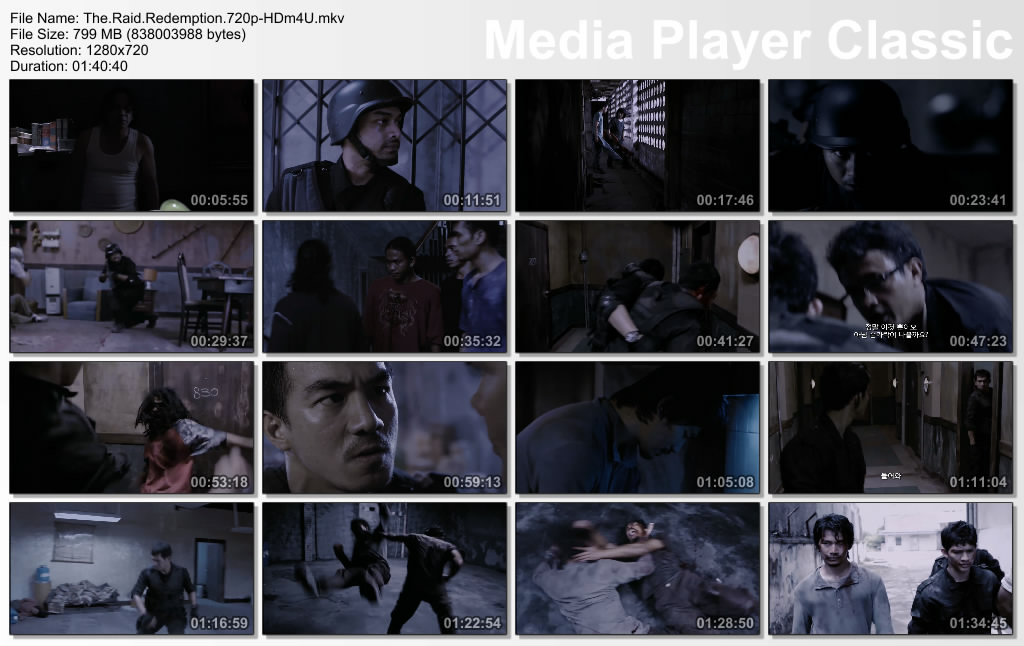
Have you seen screenshot like this?


You wanna create it yourself? It's easy. Just using your Media Player Classic. Easily follow this steps.

1. Of course you need to have Media Player Classic (MPC). Download it here.

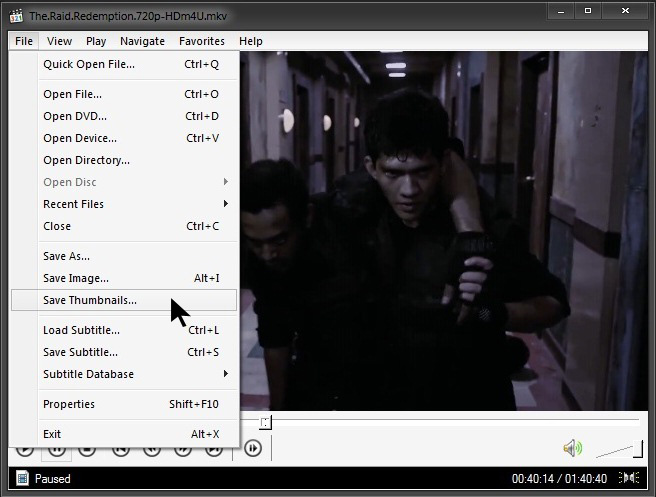
2. Play any movie that you want to take a screenshot. Then, go to File tab --> Save Thumbnails


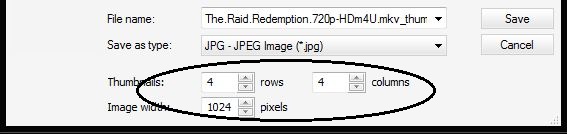
3. Then, you can customize the amount of thumbnails, columns or image width. Don't forget to set directory where you want to save the screenshot.


4. When you finish customizing, just click Save.

Finish!

You can create a screenshot of any film with MPC. Have a nice day! =)